Throughout my career as a software engineer I’ve gotten a list of applications that I use everyday. These tools are not necessarily about programming, but things that improve my overall work experience, be it at my day job or side projects.
List of tools
The below list are the applications that I can’t be without. These are one of the first things I install on a new PC. Most of these tools have alternatives, but these are the ones that flowed better with how I use the computer.
Also, I have excluded anything programming specific like VSCode, Windows Terminal, Oh My Posh, and more because they are more oriented for developers, and this will be another post.
Ditto
When was the last time you wanted to retrieve an item you copied three “copies” ago? Well, there’s an app for that. If you press Win + V you get a history of what you have copied in your current session.
But, sometimes I’ve wanted to retrieve something I copied yesterday or from before I restarted my computer. This is where Ditto comes in. Ditto is a clipboard manager that creates a database on disk so copied items are stored for a longer period of time (that the user can configure). By pressing a key combination a pop up with copy history shows, and you can select using the arrows or search through all the saved items.
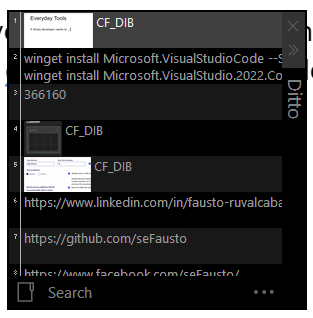
I’m so used to having Ditto, that I can’t work without it. I use to “keep something safe” when I’m moving code around, or if navigating away from a window or web page, but I might need to recover information. Oh and it also stores screenshots!
PowerToys
PowerToys is an awesome collection of tools that make Windows OS better. This is developed by Microsoft. It features many modules, but the one that I use the most is FancyZones. With FancyZones you can divide your screen into sections, and then when dragging a window around you can make it “snap” to that zone. This is like a more advanced Aero Snap.
A very recent feature called Workspaces. This is a module to take a snapshot of which application windows you have along with their location, so later you can trigger the module and things will automatically start and move to those locations.
There are many other modules here, like remapping keys, creating your own shortcuts, an easier way to view environment variables, host file entry manager, among many many other features. Seriously, it’s great, you should check it out!
Wincompose
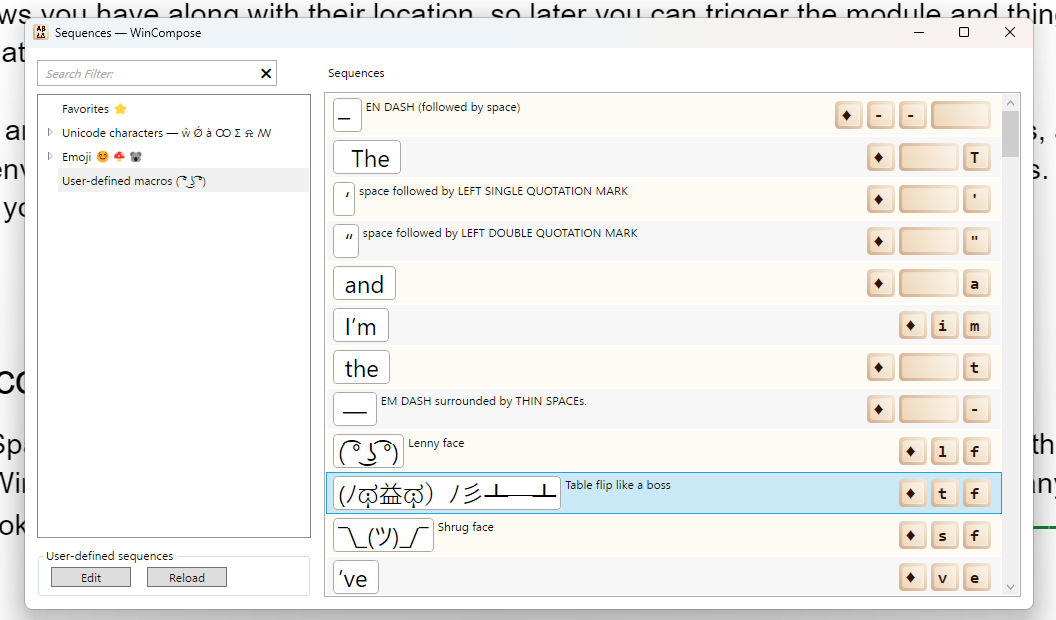
As a Spanish speaker on an American English keyboard it’s hard to type the letters with tildes (á,é,í,ó,ú). With WinCompose I set up a shortcut for each letter with the tilde. You can configure any kind of keystrokes. For example, by hitting right alt, t, f, it will write (ノಥ益ಥ)ノ彡┻━┻.
Note: PowerToys has a module called Quick Accent, but I have been using wincompose for so long that it is hard for me to move over to a different tool.
Synergy
This tool allows me to control many computers (even if they are different OS) with one mouse and keyboard. The way it works is by setting up one computer to be the server and any additional computer to be a client. This is the only tool in this list that is paid.
Note: PowerToys also has a module called Mouse Without Borders. While they accomplish the same thing, the machines have to be windows. Overall, I like the smoothness of Synergy more, I had a few glitches with Mouse Without Borders.
Paint.net
This is a light-weight (maybe very lightweight) Photoshop. I’ve used it for years for quick image manipulation. I’m not even a novice at image manipulation, but Paint.net does exactly what I need or even know what to do.
Obsidian
A few years ago, I fully understood the power of markdown and started to take all my notes in Markdown (I follow strict rules too). Then I found out about Obsidian. Here you set up a Vault where you will have all notes related to that vault. Since it’s all markdown, it’s very easy to create good looking, easy to read, portable notes. You can link between md files, add images, get a graph of how your notes are related. Plus there are a ton of plug-ins to make it more usable to you.
More?
I’m always on the lookout on how I can make things easier to use. It could be new software or physical devices. I’ve gone through many kinds and sizes of keyboards (my current keyboard is a Keychron K2), mice (I’m using the best mouse ever Logitech MX Master 3s).
So, I always welcome suggestions for new software or tools to try.
Comments
27 responses to “My Everyday Tools”
https://shorturl.fm/56s1h
https://shorturl.fm/q86k4
https://shorturl.fm/TLh2O
https://shorturl.fm/8nzPL
https://shorturl.fm/BHzqw
https://shorturl.fm/hLt3f
What’s up everyone! Gave vuabetvn a shot last week. It had a few quirks, but overall a positive experience. Got some interesting options I haven’t seen anywhere else. Definitely check out vuabetvn.
That dopamine rush they talk about with quick wins is real! Seeing those instant results-like the fast verification at u888vip link-definitely adds to the excitement. It’s all about that immediate gratification in gaming, isn’t it? Fun read!
Solid analysis! Seeing responsible gaming gaining traction is great – platforms like jilivs club are leading the way with verification & security. Key for sustainable growth in the SEA market, right? 🤔
ypmfiz
https://shorturl.fm/GoCbb
https://shorturl.fm/kUEh9
https://shorturl.fm/jjf8V
https://shorturl.fm/BW43p
https://shorturl.fm/A7Y85
https://shorturl.fm/BtXVg
https://shorturl.fm/bfzxQ
Hey everyone! Been using bong99vip for a while now, primarily for football betting. The odds are generally competitive, and they cover a lot of different leagues. Customer support is decent, too. Worth checking out if you’re a football fanatic!
https://shorturl.fm/Utf1v
https://shorturl.fm/5UMYr
Yo, F8betlgoptimusl9! Just checked you out, seems promising. Hope the games are fire and the payouts are quick! Gonna tell my crew to give it a spin. Check it out here: f8betlgoptimusl9
Special ability to earn $ASTER bonus https://is.gd/CGTnqR
bi05y2
Really insightful article! It’s great to see platforms like jljl77 apps prioritizing a smooth user experience & quick deposits (GCash/PayMaya are key!). Considering responsible gaming alongside fun – check out a jljl77 apps download apk for options! 👍
AI Girls Video
Promote, refer, earn—join our affiliate program now!
Boost your earnings effortlessly—become our affiliate!